AI Tools
Turn a Chapter into Checked Quizzes and Flashcards
Turn one chapter into quizzes and flashcards with Gemini Notebook, formerly NotebookLM. Follow a worked example, copy prompts and check answers against notes.
You can use NotebookLM flashcards and quizzes to turn a chapter into a practice set. The important step comes after generation: check whether the answers are correct and whether the questions cover what you need to study.
Google renamed NotebookLM to Gemini Notebook in July 2026. You may still see the earlier name in tutorials and search results.
Start with a topic small enough to check in one sitting. A whole textbook can produce a large deck while leaving you unsure which chapter or definition an answer came from.
Start here: follow the chapter workflow, check the worked example, or download the free practice pack.
Official product documentation was checked on November 4, 2026. The lesson, questions and corrections below are original editorial examples. They are not reported outputs from a live Gemini Notebook test, an exam prediction or a claim of improved marks. There are no affiliate links.
Check Your Source and Account First
Use your own notes, a teacher-approved handout or material you are permitted to upload. Access to a book or PDF does not automatically establish permission to upload or share it. Follow your school or college’s AI rules.
Google’s availability page lists India for browser access. Personal-account age requirements and school-managed access differ; some features have additional restrictions. For a school account, check with your institution and use Google’s work and school account guidance.
Before importing, record the subject, chapter title, edition or class-note date, and the section you intend to revise. For a CBSE, state-board or university course, use your assigned edition and current syllabus. Do not assume a generated set knows which portions your teacher has excluded.
If your notes are on paper, the student scanning guide covers making a readable PDF. Check page order, headings, minus signs, fractions and units in the imported source. A wrong symbol can produce a plausible question with a wrong answer.
Make a Small Quiz and Flashcard Set
The following product steps describe the computer browser workflow in Google’s quiz and flashcard help:
- Open or create a notebook and add your source. You need edit access to generate study aids.
- In Studio, choose Quizzes or Flashcards. Use the pencil control to customise the focus and difficulty.
- Generate a small set. The documented quantity choices are fewer, standard and more; an exact count in your prompt is a request, so check the result.
- Use Explain when needed, then verify the explanation against the source.
Google’s source guidance supports pasted text and PDFs, among other formats. For this first exercise, add only the intended lesson. If you keep other sources in the notebook, select the relevant ones and name the lesson in your prompt. Check the generated set’s scope rather than assuming a selection guarantees perfect coverage.
Use a quiz when you want to attempt questions before seeing answers. Use flashcards for one short recall task at a time. A card asking for a definition, three exceptions and a worked calculation is easier to review if you split it into separate cards.
A quiz prompt you can adapt
Create a short practice quiz from [source title], sections [range],
for [course level]. Use only this material. Include recall, explanation
and one application question where the source supports it.
Avoid ambiguous wording and multiple correct options in a single-answer
question. Do not invent facts to fill a gap. Keep the answer key separate
from the questions where the format allows it.
A flashcard prompt you can adapt
Make a small flashcard set from [source title], sections [range].
Use one clear question and one short answer per card. Keep important
definitions, symbols and units consistent with the source.
Avoid repeating the same fact in several cards. Leave unsupported
topics out and tell me which requested topics the source does not cover.
These are editorial starting prompts. If you need a written answer key with source locations, ask for that separately in chat. A prompt cannot guarantee the answer or format will be correct.
Worked Example: From Notes to Checked Answers
Use this original mini-lesson to try the process without uploading a textbook. It covers a small part of average speed, not a complete motion chapter or a board-specific lesson.
Source title: Average speed — practice note, version 1
| Source label | Lesson statement |
|---|---|
| S1 | Average speed = total distance travelled ÷ total elapsed time. |
| S2 | Use compatible units. Metres divided by seconds gives m/s; kilometres divided by hours gives km/h. |
| S3 | One hour contains 60 minutes. One minute contains 60 seconds. Divide minutes by 60 to express that time in hours. |
| S4 | For a whole-journey average, elapsed time includes stops during the journey. |
| S5 | A journey’s average speed does not mean the speed stayed the same throughout. |
| S6 | A cyclist covers 6 km in 20 minutes, including stops. Time = 20/60 hour = 1/3 hour. Average speed = 6 ÷ (1/3) = 18 km/h. |
The labels are our own checking aids, not Gemini Notebook citation numbers. The basic distance/time relationship is also explained in OpenStax’s section on speed. The wording and cyclist example here are original.
Try the questions before opening the answers
- What two totals do you need to calculate average speed?
- The cyclist in S6 has an average speed of: A. 0.3 km/h; B. 18 km/h; C. 120 km/h; D. 30 km/h. Choose one.
- A journey has 10 minutes of moving time and a 5-minute stop. What time belongs in the whole-journey calculation?
- True or false: an average speed of 18 km/h proves the cyclist travelled at 18 km/h for the entire journey. Explain.
- Does this note provide a formula for acceleration?
- A runner covers 300 m in 60 seconds. What is the average speed in m/s?
Checked answer key
| Question | Checked answer | Source and reasoning |
|---|---|---|
| 1 | Total distance and total elapsed time | S1 gives the relationship. |
| 2 | B: 18 km/h | S3 and S6: 20/60 = 1/3 hour; 6 ÷ (1/3) = 18. |
| 3 | 15 minutes | S4: 10 + 5 includes the stop. Convert if another time unit is required. |
| 4 | False | S5 distinguishes a whole-journey average from speed at every moment. |
| 5 | No; it is not covered | No statement S1–S6 gives that formula. Do not add it to a source-only answer key. |
| 6 | 5 m/s | Derived from S1 and S2: 300 ÷ 60 = 5. This is a new application, not a quoted example. |
Question 5 checks the source boundary. The useful answer is recognising missing material. Put acceleration on a separate study list if your actual syllabus includes it; this six-statement note cannot cover that topic.
Check Every Answer Before Revising from It
Keep an answer only when you can locate its support and explain the reasoning. Google’s chat documentation describes source-linked answers. A citation is a place to investigate, not proof that the question, calculation or interpretation is correct.
For each item, check:
- Source: does the referenced passage actually support the answer?
- Meaning: have words such as “always”, “only” or “except” changed the claim?
- Calculation: are the formula, conversion, arithmetic and final unit right?
- Question: is there one clear answer for a single-answer item?
- Scope: is the topic in the selected material and your required syllabus?
Here are three deliberately flawed items and how to fix them:
| Flawed item | What went wrong | Correction |
|---|---|---|
| “6 ÷ 20 = 0.3, so the cyclist travels at 0.3 km/h.” | The division uses minutes while the answer claims hours. | 0.3 km/min, or convert the time first to obtain 18 km/h. |
| A single-answer question offers both “5 m/s” and “300 m/min” for the runner in Q6. | Both options describe the same speed. | Replace one option or explicitly allow multiple correct answers. |
| A card adds an acceleration formula while claiming to use only S1–S6. | The supplied note does not contain that topic. | Remove the card from this set and find an approved source for the separate topic. |
Use Keep / Fix / Remove in your review notes. For a fix, record the corrected answer and source location. If you cannot resolve an issue, leave the item out until you check with a teacher or a suitable reference.
Review this proposed answer key against [source title]. For every item,
give its supporting section or passage, explain any calculation, and
mark unsupported statements. Distinguish a derived answer from a fact
stated directly. Do not invent page numbers. I will check the source.
For a very short source, Google notes that citations may refer to the whole document rather than individual passages. Use the named statements above or your own headings to keep a manual record. Do not mistake our S-labels for verified automatic citations.
Check Coverage Against the Chapter and Syllabus
A set can have correct answers and still miss half the chapter. Copy the chapter headings or learning objectives into a small checklist before generating more questions.
For the sample note, a coverage check could be:
| Topic | Practice item | Further action |
|---|---|---|
| Definition and required totals | Q1 | Explain the formula without looking. |
| Units and conversion | Q2, Q6 | Check an additional conversion from your course. |
| Stops within elapsed time | Q3 | Explain why moving time alone would differ. |
| Average versus constant speed | Q4 | Give your own changing-speed journey example. |
| Topics outside this note | Q5 identifies one | Add approved material if the syllabus requires it. |
For your actual chapter, tick each required heading only after you have a suitable checked question. Ten questions repeating one definition do not cover ten topics. Include the kinds of tasks your course uses: recall, explanations, calculations, diagrams or extended answers.
If you revise in Hindi or another language, keep a small list of terms used in your textbook. Ask for those terms to remain consistent, then compare the wording yourself. For a diagram or equation, inspect the original page rather than relying on its generated description.
Practise, Then Review What You Missed
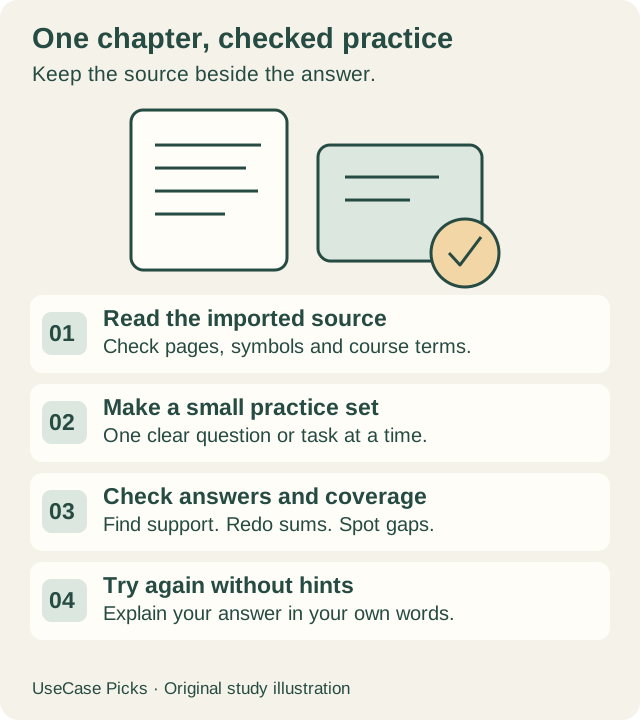
Try a question with the answer hidden. Write or say your reasoning before checking it. When you miss something, record the cause: forgotten definition, misunderstood idea, calculation, unit or unclear question.
Four example flashcards from the lesson:
| Front | Back |
|---|---|
| What is the formula for average speed? | Total distance ÷ total elapsed time. S1. |
| How do you convert minutes to hours? | Divide the number of minutes by 60. S3. |
| Does whole-journey elapsed time include stops? | Yes, stops during that journey are included. S4. |
| Does average speed prove constant speed? | No. Speed may change during the journey. S5. |
Return to a missed concept later and try a different question without hints. This is a suggested study routine; a score on a repeated quiz does not establish exam readiness. Use your course exercises and teacher feedback too.
Keep the next review date in your study planner. The notebook’s practice activity does not automatically update that planner.
Free Access, Downloads and Common Problems
Google’s plan table lists Standard access without a paid AI plan, with 100 notebooks and 50 sources per notebook. Those are storage/organisation limits, not an unlimited quiz allowance. Its usage guidance says AI use depends on the work requested; check Settings → Usage and the account’s reset information. School editions can have different allowances.
Do not pay simply to make a larger deck. First check whether a smaller, corrected set covers the topic. If you hit a limit, continue reviewing material already checked and look at the stated reset time.
Google documents CSV download for flashcards. This does not establish a built-in quiz export or a tested Anki import. If moving cards to another app, inspect its import fields, separators and front/back mapping with a few checked cards first. Keep a copy you can read outside the app.
| Problem | What to check first |
|---|---|
| Quizzes or flashcards are missing | Confirm the signed-in account, edit access and current desktop feature availability. Ask your school administrator about managed access. |
| Output uses the wrong chapter | Check the selected material, source title and scope in the prompt. |
| A symbol or answer looks wrong | Open the imported source beside the original; inspect the text and calculation. |
| You corrected the source but the old set is unchanged | Generated Studio outputs do not update automatically after source changes. Regenerate or correct your saved study material, then recheck it. |
| You want an exact number of questions | Count the result; quantity controls and prompts do not establish an exact-count guarantee. |
Download the Practice Pack and Review Checklist
Download the free chapter-to-practice pack (.md). It contains the original note, six questions, a separate answer-key section, four flashcards, reusable prompts and blank review/coverage tables. Copy it into a notes or document app; it is an editable text file, not an automated quiz app.
When trying it in Gemini Notebook, copy only the marked source block first. Keep the checked key separate so you can compare your generated result. The download is free to use and adapt for your own study, including its original sample; it grants no rights to third-party course materials.
Frequently Asked Questions
Can Gemini Notebook make questions from a textbook chapter?
It can generate practice material from supported sources you add. Check upload permission, source legibility, scope and every answer. Use the original practice note here if you want a simple permitted starting point.
Are NotebookLM and Gemini Notebook different tools?
Google renamed NotebookLM to Gemini Notebook. Older guides and searches still use NotebookLM. Follow the current help pages and the controls available in your account.
Can I use these quizzes for CBSE or university revision?
Use your assigned material and syllabus, then check the answers and coverage. Our small speed example is not a complete chapter, official question paper or prediction of what will be assessed.
Can I trust a flashcard because it has an explanation?
Check the explanation against the actual source. It can repeat the same error as the answer. Remove unsupported items and redo calculations yourself.
Related Guides
- AI tools for student explanations, research and revision
- Study apps for notes, assignments and timetables
- Microsoft Lens alternatives for scanning notes
Sources Checked
Official documentation checked November 4, 2026:
- Google: NotebookLM renamed Gemini Notebook
- Google: availability and account requirements
- Google: adding sources and source-update limitations
- Google: generating flashcards and quizzes
- Google: source-linked chat
- Google: plans
- Google: usage limits
- Google: school and work accounts
- OpenStax: average-speed concept reference